By 2026, it is practically a SaaS industry standard: if your application doesn't have a conversational AI assistant, you are already behind. From CRM platforms drafting client emails to DevOps tools summarizing logs, AI assistants have revolutionized user workflows. But embedding a Large Language Model (LLM) into your application isn't just a feature update—it is the introduction of a highly unpredictable interface.
While developers spend countless hours ensuring these assistants provide helpful, accurate answers, a critical blind spot remains: abuse by the user. Whether it is a malicious actor actively trying to break your system or a seemingly valid user pushing boundaries to extract free compute, SaaS developers must build robust guardrails and rigorously test for abuse.
The Dual Threat: Bad Actors and "Valid" Users
When we think of cyber threats, we typically picture external hackers exploiting vulnerabilities. However, AI assistants introduce a paradigm where authenticated, paying users can become the threat.
1. The Malicious Actor: Bad actors use techniques like prompt injection and jailbreaking to hijack your AI assistant. Their goals range from data exfiltration (tricking the AI into revealing other users' PII or proprietary training data) to using your infrastructure to generate malware, phishing templates, or illicit content.
2. The Exploitative Valid User: Often overlooked is the valid user who abuses the AI for unintended, resource-heavy tasks. If your SaaS app charges a flat monthly fee, a user might hijack your assistant's context window to process massive external datasets, effectively stealing expensive compute and API tokens. Others might attempt to extract your proprietary system prompts to reverse-engineer your intellectual property.
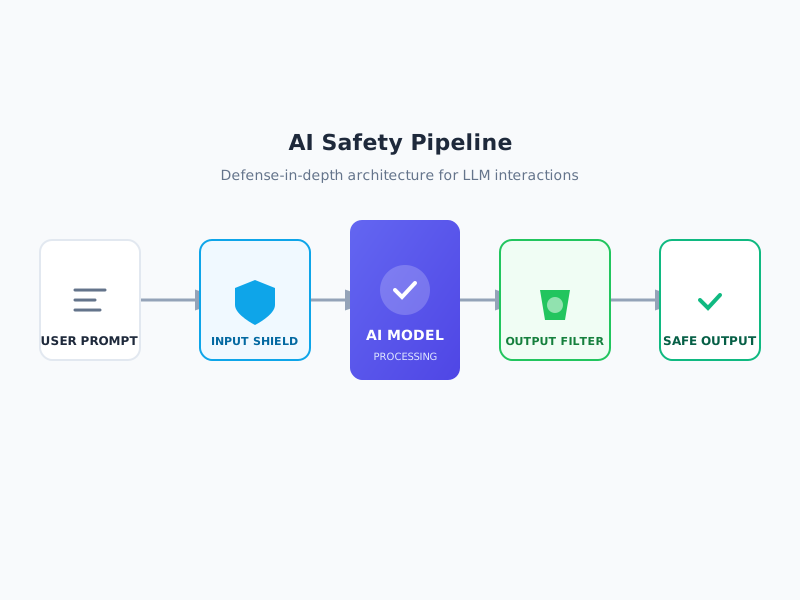 The multi-layered approach to AI safety: screening inputs for malicious intent and filtering outputs for harmful content.
Building the Guardrails
To mitigate these risks, developers must implement layered guardrails around their AI assistants. Treating the LLM as a trusted component is a recipe for disaster; it must be treated as a zero-trust entity.
- Input Validation and Sanitization: Before a user's prompt ever reaches the model, it must be scanned for known injection patterns, malicious intent, and anomalous length.
- Contextual Boundaries: The AI must be strictly scoped. A billing assistant should outright refuse to write Python scripts. These boundaries must be enforced at the system-prompt level and backed by secondary validation models.
- Output Filtering: Guardrails must exist on the way out, too. If the model hallucinates or is successfully manipulated into outputting sensitive data, a Data Loss Prevention (DLP) filter should catch and redact the response.
- Rate Limiting and Token Quotas: To prevent resource exhaustion from valid users, strict rate limits and token quotas must be tied to user accounts and subscription tiers.
The Developer's Mandate: Adversarial Testing
Building guardrails is only half the battle. The most critical step—and the one most frequently skipped in the rush to ship AI features—is adversarial testing. Developers must assess how their AI assistants can be used and determine the potential for abuse before deployment.
Red Teaming the Assistant: QA testing can no longer just verify if a feature works; it must verify if a feature can be weaponized. Security teams and developers must actively attempt to break the guardrails. This involves crafting complex, multi-turn prompt injections to see if the AI will eventually drop its persona and execute unauthorized commands.
Automated Prompt Fuzzing: Just as traditional software relies on fuzzing to find memory leaks, AI assistants require prompt fuzzing. Developers should use automated tools to bombard the AI with thousands of edge-case inputs, adversarial prompts, and conflicting instructions to map out the model's failure states.
Role-Based Access Control (RBAC) Verification: Testing must ensure that the AI assistant respects the user's existing permissions. If a user doesn't have access to an admin dashboard, the AI assistant should not be able to summarize admin-level data for them.
Conclusion
Adding an AI assistant to your SaaS application is akin to handing every user a powerful, natural-language command line. Without strict guardrails and comprehensive adversarial testing, you are leaving your application open to data leaks, resource drain, and reputational damage. In the modern SaaS landscape, securing your AI isn't an afterthought—it is the foundation of the feature.